The transition from speculative text-to-video experimentation to production-ready asset generation has forced a shift in focus. For agencies delivering high-stakes visuals, the “prompt and pray” method is no longer viable. Success in the current landscape depends on a technical understanding of the “first frame”—the anchor upon which all subsequent motion is built. Within the context of Nano Banana Pro, the quality of this source asset dictates the mathematical ceiling of the final output. If the base image contains structural ambiguities or poor lighting data, the diffusion process will inevitably magnify these flaws over time.
This isn’t merely about aesthetics; it is about temporal consistency. When an engine like Nano Banana Pro attempts to interpret motion, it relies on the clarity of the initial pixel grid. The more precise the information provided at the start, the less the AI has to “hallucinate” to fill the gaps between frames. For the operator, this means that the workflow starts long before a single frame is rendered.
The Technical Foundation of First-Frame Fidelity
In many generative pipelines, the first frame acts as a blueprint. It provides the depth map, the lighting orientation, and the textural boundaries that the motion model must respect. When using Banana Pro tools, professionals often find that the difference between a usable 4-second clip and a jittery mess lies in the sharpness of the source image.
A common mistake is feeding low-resolution or overly compressed images into the video generator. Compression artifacts—the “blocks” or “noise” found in lower-quality JPEGs—are interpreted by the AI as actual texture. When the motion begins, the AI attempts to animate these artifacts, leading to what we call “pixel swimming” or “shimmering.” This is why a dedicated AI Image Editor is essential for pre-production. Before any video generation occurs, the source asset must be cleaned, upscaled, and denoised to ensure the AI sees clean edges rather than digital noise.
However, even with high-resolution sources, there is a degree of uncertainty. It is important to note that even the most refined first frame cannot always guarantee a perfect simulation of physics. In complex scenes involving fluid dynamics or cloth simulation, the model may still produce unpredictable results regardless of the source quality. This limitation is a current reality of generative video; the first frame sets the stage, but it does not entirely dictate the performance.
Pre-Processing with the AI Image Editor
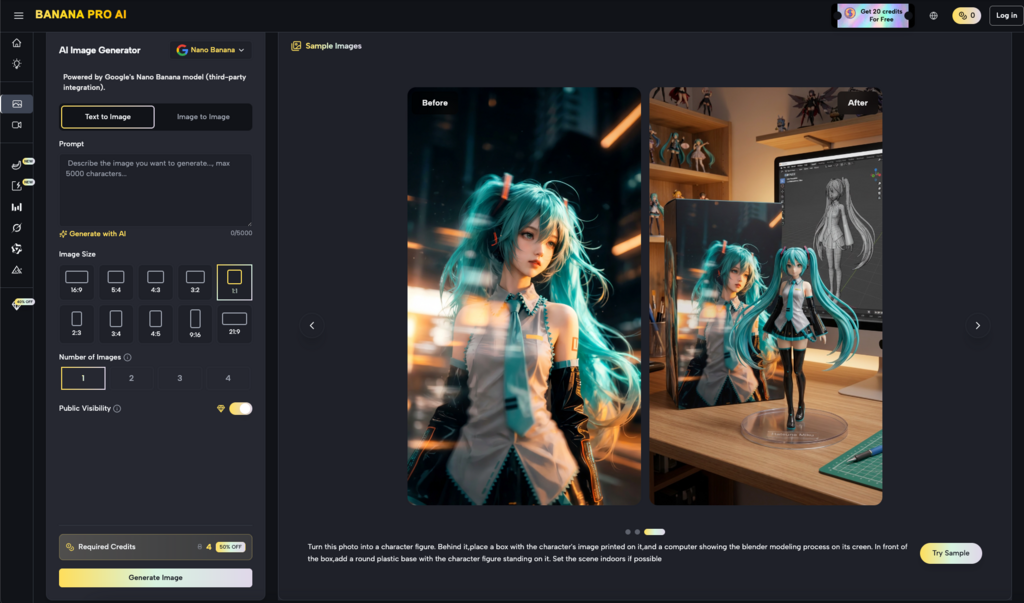
For content teams, the workflow should ideally involve a multi-stage approach. Rather than generating an image and immediately sending it to video, there should be a refinement phase. Utilizing an AI Image Editor allows the creator to adjust lighting levels and contrast ratios that might otherwise confuse the video engine.
For instance, shadows that are too deep can be interpreted by Nano Banana as “empty space” or “voids,” leading to strange warping effects when the camera moves. By using the editor to lift the shadows slightly and define the edges of objects, you provide the motion model with better tracking points. This is a tactical approach used by experienced operators: they are not just making the image look better; they are making it more “legible” for the motion algorithms.
Within the Banana AI ecosystem, this synergy between static and dynamic tools is what allows for professional-grade output. The Nano Banana model is specifically tuned to recognize the clean outputs generated by its sister tools, creating a closed-loop system where data integrity is maintained from the first pixel to the last frame.
Compositional Choices and Motion Vectors
Composition is often overlooked in AI video, but it remains one of the primary drivers of quality. In traditional cinematography, composition guides the eye. In AI video generation, composition guides the motion. A centered, static subject with a clear foreground and background is far easier for Nano Banana Pro to process than a cluttered, wide-angle shot with overlapping elements.
When planning a shot, think in terms of layers. If you are using Banana Pro to animate a product shot, ensure that the product is clearly separated from the background. High contrast between the subject and the environment helps the model understand what should remain stable and what should be influenced by the motion prompt.
If the composition is too busy, the AI often struggles to differentiate between objects. This can lead to “merging,” where a background element suddenly becomes part of the foreground subject during a camera pan. While composition can mitigate this, creators must accept that some complex geometric arrangements remain beyond the reach of current temporal consistency. Expecting a model to perfectly navigate a lattice of thin lines—like a birdcage or a wire fence—while moving the camera is currently an area of high failure risk.
Lighting as a Predictor of Temporal Stability
Lighting is the “signal” in the signal-to-noise ratio of AI video. In the Nano Banana engine, light sources define the 3D space. If your first frame has inconsistent lighting—such as multiple conflicting light sources with soft, undefined shadows—the video generator will often struggle to maintain light-path consistency.
To achieve agency-level results, the first frame should ideally follow traditional lighting principles. Strong “key” lighting helps the AI identify the geometry of the face or object. This clarity allows the AI to calculate how light should fall across the surface as the object rotates or the camera moves.
When you use an AI Image Editor to reinforce these light paths, you are essentially providing the model with a map of the scene’s volume. This reduces the likelihood of the “flicker” effect, which often occurs when the AI is unsure of how a shadow should react to a change in perspective. Banana Pro users who take the time to refine their lighting in the static phase consistently report fewer issues with flickering in the final video.
The Operational Reality of the “Golden Frame”
In a production environment, the concept of the “Golden Frame” is critical. This is the single image that has been vetted for resolution, composition, and lighting before being committed to the video render queue. Using Banana AI tools, the process of finding this frame is iterative.
1. Generation: Create the base concept using a text-to-image prompt.
2. Refinement: Pass the image through a specialized editor to fix structural errors (e.g., extra limbs, warped architectural lines).
3. Optimization: Use upscaling to ensure the pixel density is sufficient for the target resolution.
4. Animation: Feed the optimized frame into Nano Banana Pro.
This pipeline reduces waste. Instead of generating fifty low-quality videos and hoping one is usable, the operator spends more time on the source asset to ensure that the first render is a success. This shift from quantity to quality is what separates amateur workflows from professional ones.
Texture Management in Nano Banana
Nano Banana is particularly adept at handling natural textures like skin, fabric, and wood. However, these are also the textures most prone to “boiling”—a term used to describe textures that seem to move or change internally during a video.
To prevent this, the first frame must have a consistent textural density. If one part of the image is highly detailed while another part is blurry (due to shallow depth of field), the AI may interpret the blur as motion or a change in material. Professional operators often use the tools within the Banana Pro suite to unify the sharpness across the subject before animating. This doesn’t mean removing depth of field entirely, but rather ensuring that the transition between sharp and blurred areas is logical and clean.
Managing Limitations and Expectation Resets
It is vital to maintain a grounded perspective on what these tools can do. Despite the advancements in the Banana Pro ecosystem, we are still dealing with probabilistic models. There will be instances where a perfectly prepared first frame still results in a failed video.
Common failure points include:
Rapid Motion: If the motion prompt is too aggressive, the AI will tear the first frame apart to meet the movement requirement.
Semantic Drift: Over a long enough timeline (usually beyond 5-8 seconds), the AI may lose track of what the original subject was, regardless of the quality of the first frame.
Human Anatomy: Hands and eyes remain challenging. A high-quality first frame helps, but as soon as fingers start to move and overlap, the probability of artifacts increases significantly.
Acknowledging these limitations allows agencies to better manage client expectations. The goal is not perfection in every render, but a higher hit rate and a more controlled creative process.
Conclusion: The Pre-Production Priority
The evolution of AI video tools has brought us to a point where the bottleneck is no longer the generation speed, but the quality of the input. By treating the first frame as the most important part of the video production process, creators can unlock the full potential of tools like Nano Banana Pro.
Whether you are using an AI Image Editor to polish a product shot or carefully composing a cinematic scene in Banana AI, the principle remains the same: the video is only as good as its foundation. In a field often characterized by unpredictability, focusing on asset quality provides the only real lever of control an operator has. By investing time in the “Golden Frame,” you ensure that the downstream video quality is not a matter of luck, but a result of deliberate technical preparation.
Leave a Reply