
Email can carry strong evidence. It holds words, dates, senders, links, files, and reply chains. But an inbox is not a stable record. Messages can display differently across apps, devices, and systems. A saved email may look clean in one tool and broken in another.
Digital archiving turns an email into a fixed record. It preserves the message, its context, and key technical details. In some cases, teams also need a visual copy, such as a JPG, for reports, audits, legal files, or internal reviews. This turns the email into a clear snapshot.
A visual record works like a photograph of a paper document. It shows the message in a form that people can open quickly and inspect without special software. It also helps teams mark, sort, and share evidence during review.
A JPG cannot replace the original source file in every case. The source may still hold deeper metadata. But a visual version helps readers see the same message in the same way. That stable view makes email evidence easier to explain, compare, and document.
Why Email Evidence Needs A Stable Format
Email looks simple on screen. But under the surface, it behaves like a packed file. It may contain HTML, plain text, images, links, sender data, routing details, and attachments. Different apps can read that package in different ways.
This creates a problem for review. One person may open a message in Outlook. Another may view it in a browser. A third may export it from an archive. Each view can shift spacing, fonts, images, or headers. Small changes can confuse a reader.
A stable format solves this. It freezes the visible message into one clear view. Teams can add it to a report, place it in a timeline, or share it with people who do not use the same email software.
For example, an Outlook MSG file can be turned into a visual record when a team needs a clean snapshot of the message. An online tool that can convert MSG to image helps create that kind of fixed view for review and documentation.
The original email still matters. It may contain metadata that an image cannot show. But the visual copy gives teams a common surface to inspect. Everyone sees the same message, in the same form.
What An MSG File Contains
An MSG file is a saved Outlook email. It stores more than the text you see in the message body. It can hold the parts that make the email useful as evidence.
A typical MSG file may contain:
- Sender And Recipient Data -who sent the message and who received it.
- Subject Line -the short label that frames the message.
- Date And Time Details -when the message was sent or received.
- Message Body -the visible text, links, formatting, and images.
- Attachments -files sent with the email.
- Headers -technical routing details that show how the message traveled.
- Reply Chain -earlier messages in the same conversation.
This structure makes MSG useful for archiving and review. It keeps the email close to its original form. A team can open the file, inspect the visible message, and check its technical details.
But MSG files also create friction. Not every reader can open them. Some people may not use Outlook. Others may work on locked systems where extra software is not allowed. That is why teams often create a visual copy for fast review while keeping the original file as the deeper record.
Why Convert Emails Into Visual Data
Teams convert emails into visual data when they need a fixed, easy-to-read copy. An image gives reviewers one clear view. It removes software issues and helps people focus on the message itself.
Visual copies work well in reports, audits, legal files, and internal reviews. They also help when a team must share evidence with people who cannot open the original email format.
| Use Case | Why Visual Data Helps |
| Legal Review | Gives lawyers and reviewers a fixed view of the message. |
| Audit Files | Adds clear email records to compliance reports. |
| Internal Reports | Lets teams show key messages without special software. |
| Case Timelines | Helps place emails beside dates, actions, and decisions. |
| Team Review | Makes evidence easier to compare and discuss. |
| Client Or Court Packets | Presents email content in a simple, readable format. |
A visual copy also reduces confusion. Everyone sees the same layout, text, and message body. The record no longer depends on one inbox, one device, or one email app.
Still, teams should keep the source email. The image shows the surface. The original file holds deeper technical data. Together, they give both clarity and proof.
How Visual Copies Support Forensic Documentation
Visual copies help teams turn email evidence into clear case material. They do not replace the source file. They support it. The original email stays as the technical record, while the image gives reviewers a clean view of the message.
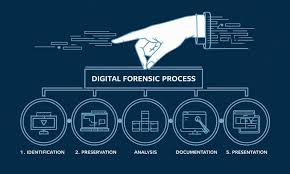
A strong forensic workflow often includes:
- Source Preservation -keep the original email file unchanged.
- Visual Capture -create a readable image of the message.
- Metadata Review -check sender, recipient, dates, and headers.
- File Labeling -name each record in a clear and consistent way.
- Case Linking -connect the email to a timeline, person, or event.
- Access Control -limit who can view, edit, or export the file.
- Audit Notes -record who handled the evidence and when.
This process works like placing a document in a clear evidence sleeve. The sleeve lets people read the page without touching the original. The source stays protected, while the visual copy helps the team discuss what it shows.
In forensic documentation, clarity matters. A visual email record makes the message easier to inspect, cite, and explain. It gives teams a shared view of the evidence while preserving the original file for deeper checks.
Conclusion
Email evidence works best when teams treat it as both a technical file and a readable record. The original message protects the deeper data. The visual copy helps people understand what the message shows.
This balance matters in audits, legal reviews, internal reports, and forensic work. A source file can prove where the message came from. An image can show the message clearly to people who need fast review.
Digital archiving does not only store files. It makes evidence usable. When teams preserve the source and create a stable visual copy, they reduce confusion and make each email easier to review, share, and explain.
Leave a Reply